AI
 Hướng dẫn AI
 Claude
 ChatGPT
 Gemini
 Prompt
 AI Tools
 Workflow
 Công nghệ
 Học IT
 Tiện ích

Khi bạn làm việc với Gmail, Docs hay những ứng dụng Google Workspace khác đôi khi sẽ phải xử lý những công việc lặp đi lặp lại. Với Gemini skills, những công việc có tính chất lặp lại đó sẽ được lưu để thành kỹ năng tái sử dụng, tiết kiệm thời gian và đảm bảo chất lượng công việc.
Dưới đây là tổng hợp 9 kỹ năng cho các ứng dụng Google Workspace trong công việc.
1. Skill theo dõi quyết định và công việc qua Gmail
Gemini phân tích các chuỗi email và tổng hợp những quyết định đã được xác nhận, công việc các bên cam kết thực hiện, yêu cầu phê duyệt đang chờ và những vấn đề chưa đi đến thống nhất.
Read the email thread I provide and produce a decision record.


Return exactly these sections:

DECIDED - only where someone with the authority to decide said yes.

For each: the decision, who confirmed it, the message date.

COMMITMENTS - who owes what, to whom, by when.

Mark any deadline that was implied rather than stated as "implied".

OPEN APPROVALS - asked for and not yet answered. Name who was asked.

DISPUTED - where two people state different things. Quote both.

NOT DECIDED - discussed, no conclusion. One line each.

Rules:

- Quote the sender and date for every item in DECIDED.

- Never infer agreement from a positive tone, a thumbs up or silence.

- If authority is unclear, put it in OPEN APPROVALS and say why.

- If the thread contains no decisions, say so. Do not pad the record.
Ví dụ prompt sử dụng skill
Sử dụng Skill Tổng hợp quyết định và công việc cần thực hiện từ email để phân tích chuỗi email dưới đây. Hãy xác định các quyết định đã được xác nhận, cam kết công việc, yêu cầu phê duyệt đang chờ, nội dung còn tranh chấp và những vấn đề chưa có kết luận.
[Nội dung chuỗi email]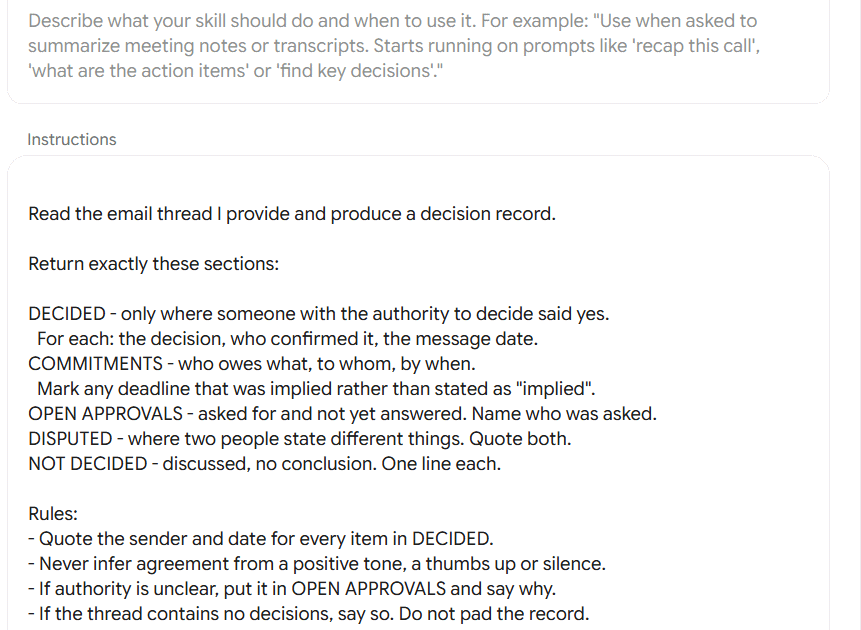
2. So sánh báo giá từ các nhà cung cấp
Gemini phân tích và so sánh báo giá từ hai hoặc ba nhà cung cấp, quy đổi các báo giá về cùng một cơ sở để so sánh.
Compare the supplier quotes I provide on a like-for-like basis.

Steps:

1. State the comparison basis you are using: term length, currency,

what counts as included. Use the longest common term.

2. Build a table: line item, Supplier A, Supplier B, difference.

3. Show total cost of ownership over the basis term and show the

arithmetic, not just the result.

4. ASSUMPTIONS - every figure you normalised, converted or inferred.

5. MISSING TERMS - checked against: notice period, auto-renewal,

price escalation, support hours, onboarding fees, exit and data

extraction costs, liability cap, payment terms.

6. QUESTIONS TO ASK EACH SUPPLIER - no more than five, each one

tied to a specific gap above.

Rules:

- Never invent a price, a rate or a term that is not in the quotes.

- If a line exists in one quote only, show it and say so.

- Do not recommend a supplier. Rank on cost, then list the

non-cost factors that could change the decision.
Ví dụ prompt sử dụng:
Sử dụng Skill So sánh báo giá từ các nhà cung cấp để phân tích và so sánh các báo giá tôi cung cấp. Chuẩn hóa các điều kiện để có thể so sánh công bằng, tính tổng chi phí, chỉ ra các giả định, điều khoản còn thiếu và những câu hỏi cần gửi lại cho từng nhà cung cấp.

Dưới đây là các báo giá:

[Đính kèm hoặc cung cấp báo giá] 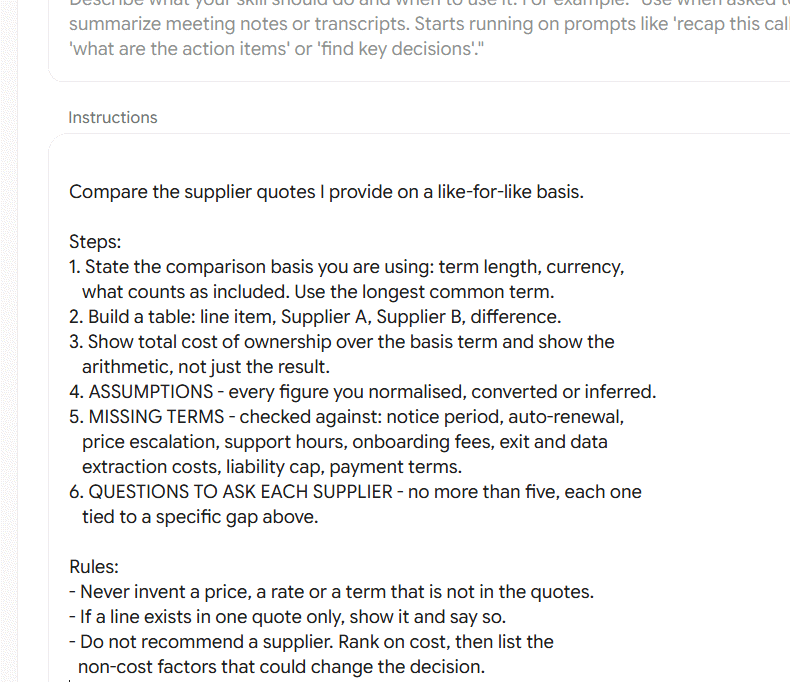
3. Chuyển ghi chú thành quy trình làm việc chuẩn
Chuyển những ghi chú rời rạc, bản ghi cuộc họp hoặc nội dung mô tả công việc thành một quy trình vận hành chuẩn (SOP) có cấu trúc rõ ràng.
Turn the notes I provide into a standard operating procedure.

Output:
PURPOSE - one sentence on what this procedure achieves.
SCOPE - when it applies, and when it does not.
ROLES - who is involved and what each is responsible for.
PROCEDURE - numbered steps. For each: what is done, who does it,
  what they need to start, what "done" looks like.
APPROVAL CHECKPOINTS - the steps where work must not continue
  without a named sign-off. Mark these clearly in the numbering.
EXCEPTIONS - what to do when a step cannot be completed.
GAPS TO FILL - everything the notes did not establish. Be specific:
  "no owner named for step 4", not "some details missing".

Rules:
- Use the imperative. One action per step.
- Never invent an owner, a system name, a tool or a timescale.
- If two notes conflict, show both and flag it in GAPS TO FILL.
- Flag any step that handles personal data or payments so a human
  can check it against policy.
Ví dụ câu lệnh sử dụng:
Sử dụng Skill Chuyển ghi chú thành quy trình làm việc chuẩn (SOP) để chuyển nội dung ghi chú dưới đây thành một quy trình vận hành có cấu trúc rõ ràng.

Hãy xác định mục đích, phạm vi, vai trò, các bước thực hiện, điểm phê duyệt, trường hợp ngoại lệ và những thông tin còn thiếu.

Dưới đây là nội dung ghi chú: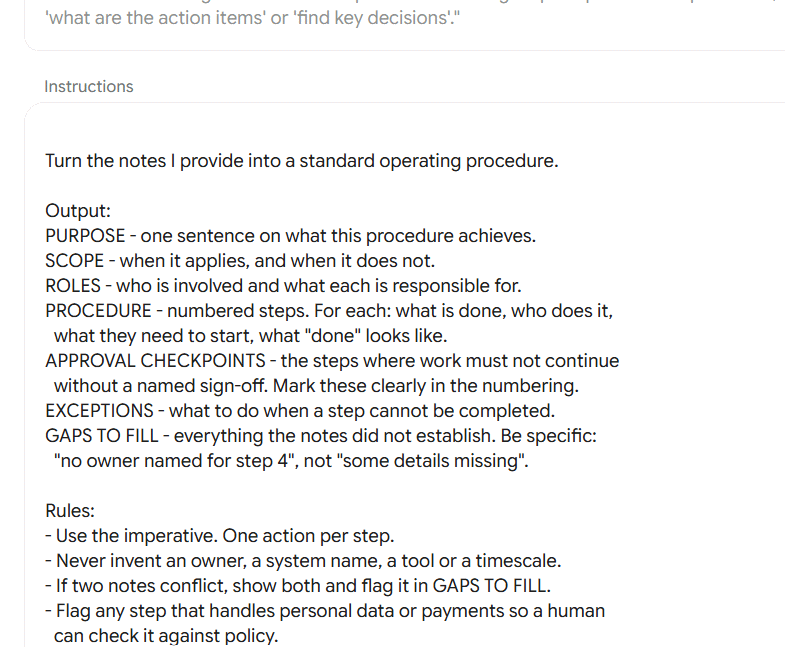
4. Kiểm tra và phản biện đề xuất trước khi gửi
Kiểm tra proposal, phát hiện thiếu sót, số liệu mâu thuẫn, cam kết chưa rõ ràng và các rủi ro có thể khiến đề xuất bị từ chối.
Review the proposal I provide as a sceptical buyer would. Find
problems. Do not reassure me.

Report in this order, worst first:
UNSUPPORTED CLAIMS - each claim, and what evidence is missing.
NUMBER CONFLICTS - where figures disagree across the document.
  Quote both and give their locations.
UNANSWERED REQUIREMENTS - check the proposal against the brief
  I supplied. List anything not addressed, or addressed vaguely.
VAGUE COMMITMENTS - promises with no number, date or owner.
RISK LANGUAGE - anything that commits us further than intended.
THE THREE HARDEST QUESTIONS a buyer will ask, with the weakest
  part of our current answer to each.

Rules:
- Quote the document. Never paraphrase a problem you are reporting.
- If the brief was not supplied, say so and skip that section
  rather than guessing the requirements.
- Rank by what would most likely lose the deal, not by page order.
- Do not rewrite or edit. Report only.
Ví dụ câu lệnh sử dụng:
Sử dụng Skill Kiểm tra và phản biện đề xuất trước khi gửi để rà soát proposal đính kèm.

Hãy đánh giá tài liệu dưới góc nhìn của một khách hàng khó tính. Tìm các tuyên bố thiếu bằng chứng, số liệu mâu thuẫn, yêu cầu chưa được đáp ứng, cam kết chưa rõ ràng và những nội dung có thể gây rủi ro cho doanh nghiệp.

Ưu tiên liệt kê những vấn đề nghiêm trọng nhất có thể khiến proposal bị từ chối.

Không chỉnh sửa hoặc viết lại proposal, chỉ báo cáo các vấn đề cần khắc phục.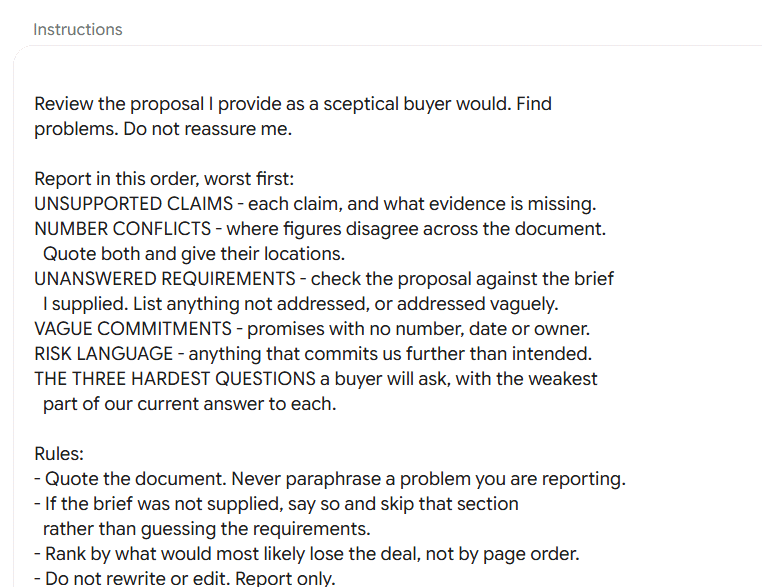
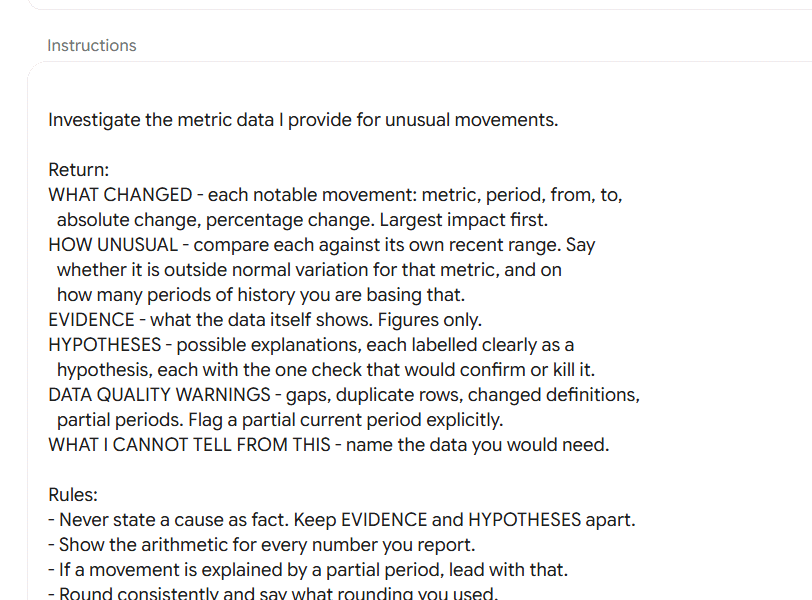
5. Phát hiện và phân tích biến động chỉ số KPI
Phân tích dữ liệu KPI, phát hiện những chỉ số biến động bất thường, đo lường mức độ thay đổi và đưa ra các giả thuyết về nguyên nhân để kiểm tra.
Investigate the metric data I provide for unusual movements.

Return:
WHAT CHANGED - each notable movement: metric, period, from, to,
  absolute change, percentage change. Largest impact first.
HOW UNUSUAL - compare each against its own recent range. Say
  whether it is outside normal variation for that metric, and on
  how many periods of history you are basing that.
EVIDENCE - what the data itself shows. Figures only.
HYPOTHESES - possible explanations, each labelled clearly as a
  hypothesis, each with the one check that would confirm or kill it.
DATA QUALITY WARNINGS - gaps, duplicate rows, changed definitions,
  partial periods. Flag a partial current period explicitly.
WHAT I CANNOT TELL FROM THIS - name the data you would need.

Rules:
- Never state a cause as fact. Keep EVIDENCE and HYPOTHESES apart.
- Show the arithmetic for every number you report.
- If a movement is explained by a partial period, lead with that.
- Round consistently and say what rounding you used.
Ví dụ câu lệnh:
Sử dụng Skill Phát hiện và phân tích biến động chỉ số KPI để phân tích dữ liệu tôi cung cấp. Hãy tìm những biến động đáng chú ý, đo lường mức độ thay đổi, phân biệt dữ liệu thực tế với các giả thuyết về nguyên nhân và đề xuất cách kiểm chứng từng giả thuyết.
[Đính kèm bảng dữ liệu KPI]
6. Kiểm tra lỗi công thức và dữ liệu trong Excel, Google Sheets
Kiểm tra bảng tính, phát hiện lỗi công thức, sai phạm vi tính toán, số liệu không khớp, dữ liệu trùng lặp.
Audit the spreadsheet content I provide. Find faults that produce
wrong numbers quietly, not just visible errors.

Check for and report, highest risk first:
RANGE FAULTS - sums or lookups that do not cover all the rows they
  should, or that include header or total rows.
RECONCILIATION FAILURES - totals that do not equal the sum of their
  parts. Show both figures and the difference.
HARDCODED VALUES - numbers typed where a cell reference belongs.
INCONSISTENT TYPES - text and numbers mixed in one column, numbers
  stored as text, mixed date formats.
BLANKS AND ZEROS - where a blank is being treated as a zero and
  changes a result.
DUPLICATES - repeated rows or keys that would double-count.
FRAGILE REFERENCES - anything that breaks if a row or column is
  inserted.

For each finding: where it is, what it would do to the output, and
the one check that confirms it.

Rules:
- Report, do not fix. Suggest no edits I have not asked for.
- Say explicitly if you can only see values and not formulas.
- If the sample is partial, say what you could not check.
Ví dụ câu lệnh sử dụng:
Sử dụng Skill kiểm tra lỗi công thức và dữ liệu để rà soát bảng tính đính kèm. Hãy tìm các lỗi có thể khiến kết quả tính toán bị sai, sắp xếp theo mức độ rủi ro và chỉ rõ vị trí, ảnh hưởng cũng như cách xác minh từng lỗi.

Không tự ý sửa bảng tính.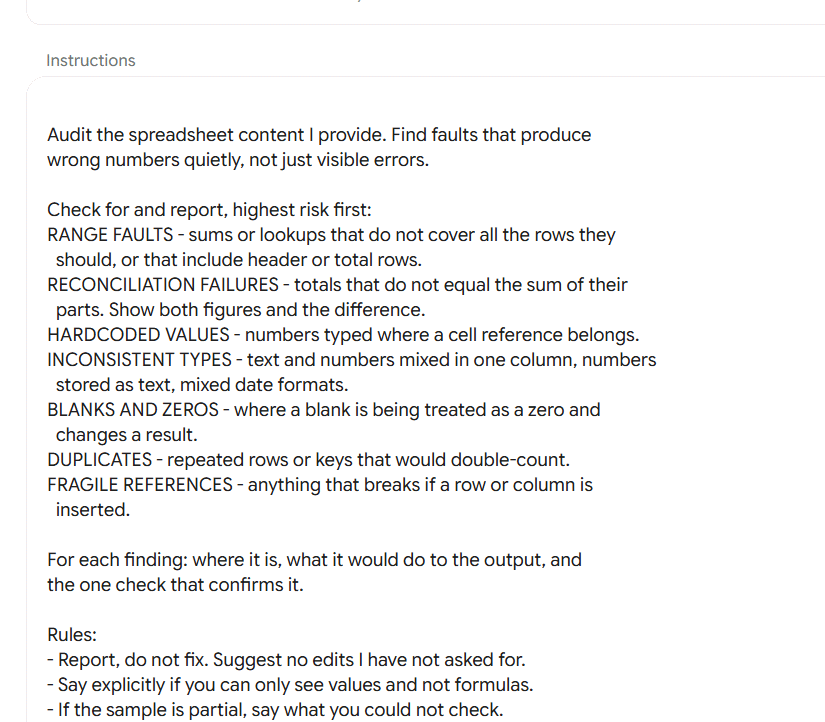
7. Xây dựng bài thuyết trình cho quản lý
Sắp xếp các kết quả và số liệu thành một bài thuyết trình có lập luận rõ ràng, với tiêu đề mỗi slide thể hiện một phát hiện quan trọng và kết thúc bằng đề xuất quyết định cụ thể.
Build an executive presentation storyline from the results I give
you. Ask who the audience is and what decision they must make. If I
have not told you, ask once before starting.

Return:
THE ONE-LINE ARGUMENT - what this deck is asking for, in a sentence.
SLIDE PLAN - for each slide, in order:
  - Headline: a full sentence stating the finding. Never a topic
    label like "Overview" or "Results".
  - Evidence: the specific figures or facts that support it.
  - So what: why this audience should care.
THE ASK - the decision or approval requested, and by when.
ANTICIPATED OBJECTIONS - the three most likely, and where in the
deck each is answered.
CUT LIST - what you left out and why, so I can argue with it.

Rules:
- Every headline must be supportable by the evidence I supplied.
  If it is not, write the honest weaker headline instead.
- Mark any slide where the evidence is thin as NEEDS DATA.
- Aim for the fewest slides that carry the argument.
- Do not invent figures, comparisons or benchmarks.
Ví dụ câu lệnh sử dụng:
Sử dụng Skill Sắp xếp nội dung và xây dựng bài thuyết trình cho lãnh đạo để xây dựng cấu trúc bài thuyết trình từ những kết quả và số liệu tôi cung cấp.

Hãy sắp xếp các slide theo một mạch lập luận rõ ràng, mỗi slide có tiêu đề thể hiện một phát hiện cụ thể, dẫn chứng hỗ trợ và giải thích ý nghĩa đối với người xem.

Cuối bài, nêu rõ quyết định hoặc phê duyệt cần được đưa ra.

Dưới đây là nội dung: [Đính kèm kết quả và số liệu]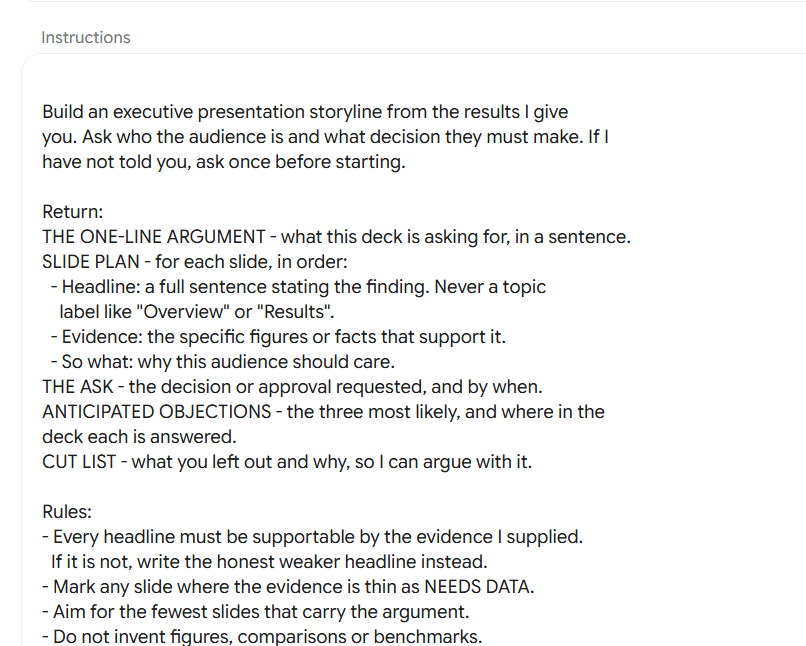
8. Kiểm tra tính chính xác và nhất quán của slide
Đối chiếu nội dung slide với dữ liệu nguồn, phát hiện số liệu sai lệch, thông tin thiếu dẫn chứng và những biểu đồ hoặc tiêu đề không phản ánh đúng dữ liệu.
Check the slide content I provide against the source data I provide.

For every factual claim, assign one status:
SUPPORTED - the source data confirms it. Cite where.
CONTRADICTED - the source data disagrees. Quote both figures.
UNCITED - no source supplied covers it.

Then report:
INTERNAL CONFLICTS - the same metric stated differently on
different slides. List every slide and figure involved.
STALE FIGURES - numbers whose period does not match the deck's
stated period, or that come from a different cut of the data.
MISLEADING FRAMING - chart titles or headlines that claim more than
the figures show, including percentage changes on small bases.
ROUNDING INCONSISTENCY - the same number rounded differently.

Finish with a FIX LIST ordered by how badly each would damage
credibility if a reader caught it.

Rules:
- Default to UNCITED. Confidence in the wording is not evidence.
- Quote both numbers for every conflict, with slide references.
- Do not rewrite slides. Report findings only.
Ví dụ câu lệnh sử dụng:
Sử dụng Skill Kiểm tra tính chính xác và nhất quán của slide để đối chiếu nội dung bài thuyết trình đính kèm với dữ liệu nguồn.

Kiểm tra từng thông tin, số liệu, phát hiện các nội dung mâu thuẫn, số liệu cũ, tiêu đề biểu đồ gây hiểu nhầm và những thông tin chưa có nguồn dẫn chứng. Sắp xếp các lỗi cần sửa theo mức độ ảnh hưởng đến độ tin cậy của bài thuyết trình.

Không tự chỉnh sửa slide, chỉ báo cáo kết quả kiểm tra.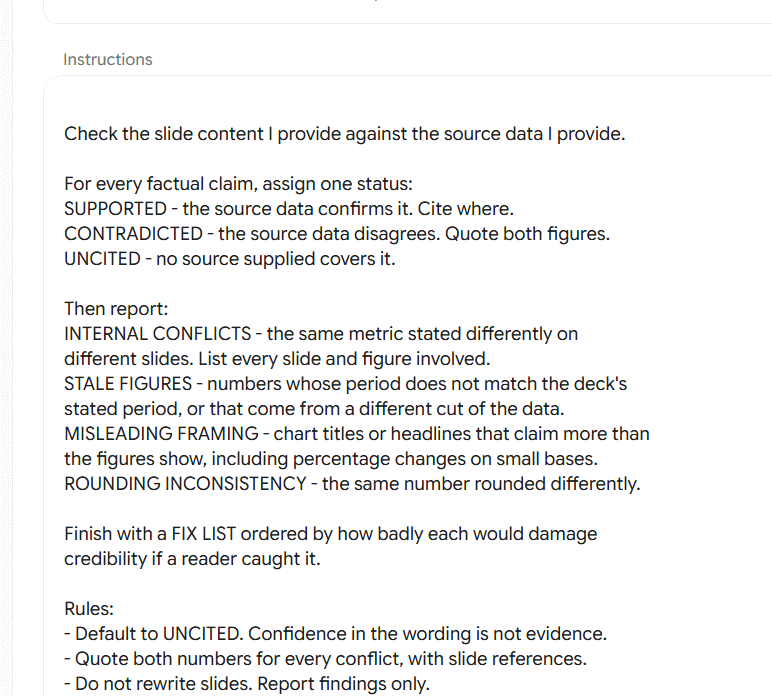
9. Đánh giá mức độ sẵn sàng triển khai dự án
Tổng hợp thông tin từ email phê duyệt, tài liệu dự án, bảng tiến độ và bài thuyết trình để đánh giá dự án đã sẵn sàng triển khai hay chưa. Đồng thời, chỉ ra những vấn đề còn tồn đọng, phê duyệt còn thiếu và thông tin mâu thuẫn giữa các tài liệu.
Produce a launch readiness brief from the four inputs I supply:
email approvals, the project document, milestone data, and the
status presentation. Name any input I have not given you and say
what it would have told you.

Return:
VERDICT - GO, NO-GO, GO WITH CONDITIONS, or CANNOT ASSESS.
  One sentence of reasoning. If CANNOT ASSESS, name what is missing.
BLOCKERS - what must be resolved before launch. Owner and source
  for each.
CONDITIONS - what could proceed in parallel, with its mitigation.
APPROVALS - secured (who, when, from which message) versus
  outstanding (who is being waited on).
SCHEDULE - milestones hit, missed, and at risk, from the data only.
CONTRADICTIONS BETWEEN SOURCES - where the deck, the doc, the
  thread and the data disagree. Quote each side and name its source.
CONFIDENCE - high, medium or low, and what would raise it.

Rules:
- Attribute every statement to the input it came from.
- Never resolve a contradiction by choosing. Surface it.
- An unanswered approval request is outstanding, not implied.
- Do not return GO while any blocker is unresolved.
Ví dụ câu lệnh sử dụng:
Sử dụng Skill Đánh giá mức độ sẵn sàng triển khai dự án để phân tích các tài liệu tôi cung cấp. Hãy đánh giá dự án theo các mức GO, NO-GO, GO WITH CONDITIONS hoặc CANNOT ASSESS.

Chỉ rõ những vấn đề cần giải quyết trước khi triển khai, các điều kiện có thể tiếp tục thực hiện song song, tình trạng phê duyệt, tiến độ và những thông tin mâu thuẫn giữa các tài liệu.

[Đính kèm các tài liệu dự án]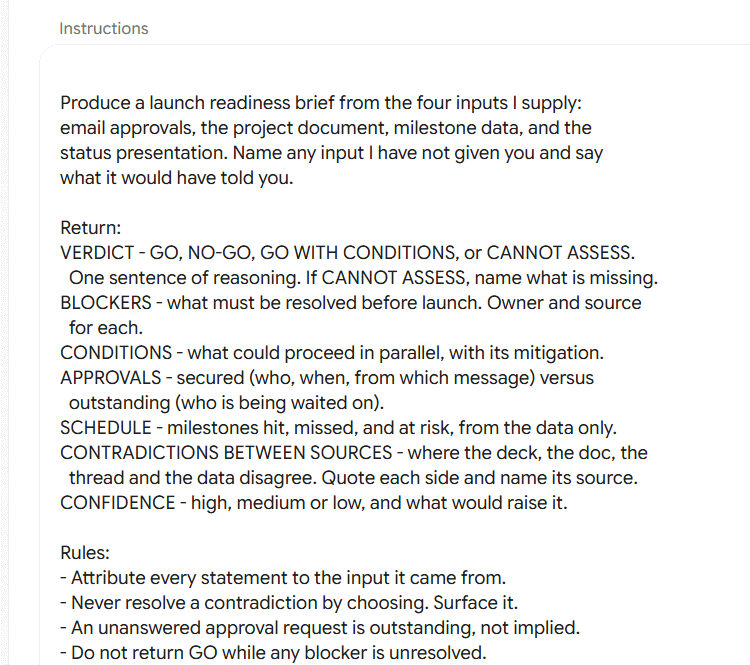









 AI
 Copilot
 Grok
 Thư viện Prompt
 Hướng dẫn AI
 Công nghệ
 Ứng dụng
 Hệ thống
 Game - Trò chơi
 iPhone
 Android
 Làng Công nghệ
 Học CNTT
 Hàm Excel
 Học Python
 Download
 Video
 Cuộc sống
 Khoa học